

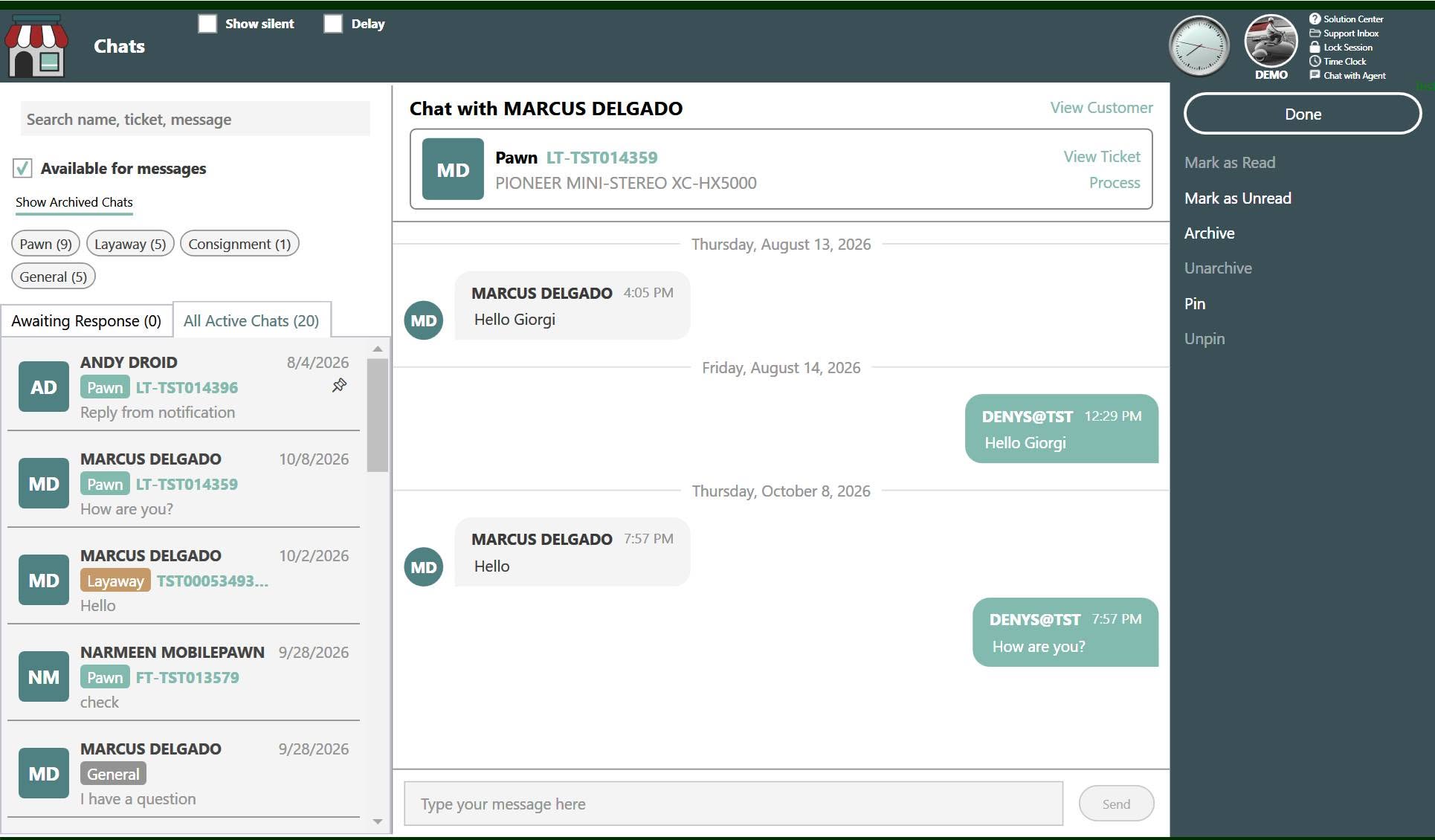
Customers message through MobilePawn or the Buya App. Your team replies right in Bravo. Your employees do not need a separate phone app to answer them. With Chat to Dashboard, customer-initiated messages come into the Bravo dashboard, where your team is already working. Customers choose their app; employees keep the conversation alongside their store work.
Picture an illustrative afternoon at a pawn counter. One employee is helping someone choose a tool. Another is working through a loan. A customer who is not in the store sends a MobilePawn message about a layaway. They want to understand the next step before making another trip. The team needs to answer, but the counter still needs attention.
Two customer apps. One place for your team.
That question should not require an employee to pick up a phone and switch into a separate app. Chat to Dashboard brings the conversation into Bravo, so the team can view and respond to messages from MobilePawn and the Buya App in its working environment.
For a busy store owner, that is the point. Another employee phone app creates another place to check and another reason to step away from the work on screen. Keeping customer messages in Bravo makes it easier to stay on top of conversations without adding that separate app to the employee's routine.
This does not mean every message will be answered immediately or that a question can never be missed. Your team still needs time and a clear process for responding. The benefit is putting messages where employees work, rather than leaving them in another app to remember.
Answer with the customer's situation in view
Return to the illustrative layaway question. Before replying, the employee needs to understand the customer's situation. Chat to Dashboard lets the team access customer profiles and related loan or layaway information, then move into the applicable transaction workflow.
The employee can review the relevant details before explaining the next step. The conversation and the work belong together: a helpful answer depends on the customer's actual situation, not simply on noticing a message.
MobilePawn also supports balance checks, due dates and payments from customers' phones. Customers using the Buya App can initiate chats too. The employees answering either app stay in Bravo.
Chat is free with both apps, with no Shopkeeper subscription needed. It is separate from paid Mobile Messenger SMS marketing. A customer starting a conversation in an app is not the same workflow as your store sending a marketing text campaign.
Make checking messages part of the shift
A dashboard does not assign responsibility on its own. Decide who checks customer conversations during a shift and who takes over when that employee is occupied at the counter. Agree on which questions employees can answer and which need a manager.
Set expectations that match your staffing. Let customers know when the team normally checks messages. Being able to send a question through either app is not the same as having someone available to answer around the clock.
A layaway question can stay connected to the work. Read the customer's message, review the relevant information in Bravo and explain the next step. If the question needs another employee or a manager, use your store's process to ensure someone takes responsibility for the reply.
A November conversation with your representative
During November 1–30, 2026, inclusive, existing Bravo customers adding MobilePawn can receive two months free. This is a new-feature offer: MobilePawn must not already be enabled. It is not a credit for current subscribers. This MobilePawn subscription offer does not extend to the Buya App and is distinct from free chat.
Talk to your Bravo representative about MobilePawn and Chat to Dashboard. Bring the counter question you want to work through. An inquiry starts a conversation about eligibility and setup; it does not automatically activate a feature.
Bring the conversation into Bravo
Already using Bravo? Talk with your representative about eligibility and setup.
Talk to your Bravo representative →